Serial Driver
Serial driver allows you to use a serial port for communication in case the debug probe of your target is not supported or cannot be used due to lack of galvanic isolation or high EMI pollution.
Using serial driver is more intrusive than using debug probe direct memory readout, however in some applications it is the only option. The serial driver works with both Variable Viewer and Recorder modules.
Serial driver setup
Make sure your target is capable of sending and receiving data using UART - test it on a simple PC terminal first.
Copy the serial driver folder from the downloaded MCUViewer *.zip file to your project.
Add the serial driver folder to the build system. Adjust the
serialDriverDefines.hfile to match your system configuration.Implement the data transmission and reception. Example for STM32 HAL could look like this:
/* RECEIVE */
void HAL_UART_RxCpltCallback(UART_HandleTypeDef* huart)
{
	if (huart->Instance == USART3)
	{
		// pass the received byte to the serial driver
		serialDriverReceiveByte(rxByte);           			// <-------
		HAL_UART_Receive_IT(&huart3, &rxByte, 1);
	}
}

/* SEND */
void serialDriverSendData(uint8_t* buf, uint16_t size) 	    // <-------
{
	// send data to the serial port
	HAL_UART_Transmit_IT(&huart3, buf, size);
}
or C2000:
/* RECEIVE */
__interrupt void INT_mySCIA_RX_ISR(void)
{
	char rxChar = SCI_readCharBlockingFIFO(mySCIA_BASE);
	SCI_clearInterruptStatus(mySCIA_BASE, SCI_INT_RXFF);
	Interrupt_clearACKGroup(INT_mySCIA_RX_INTERRUPT_ACK_GROUP);
	serialDriverReceiveByte(rxChar);						// <-------
}

/* SEND */
void serialDriverSendData(uint16_t* buf, uint16_t size)     // <-------
{
	SCI_writeCharArray(mySCIA_BASE, buf, size);
}
After that, open the Acquisition Settings window, and select the serial driver (1), serial port (2), and baud rate (3).
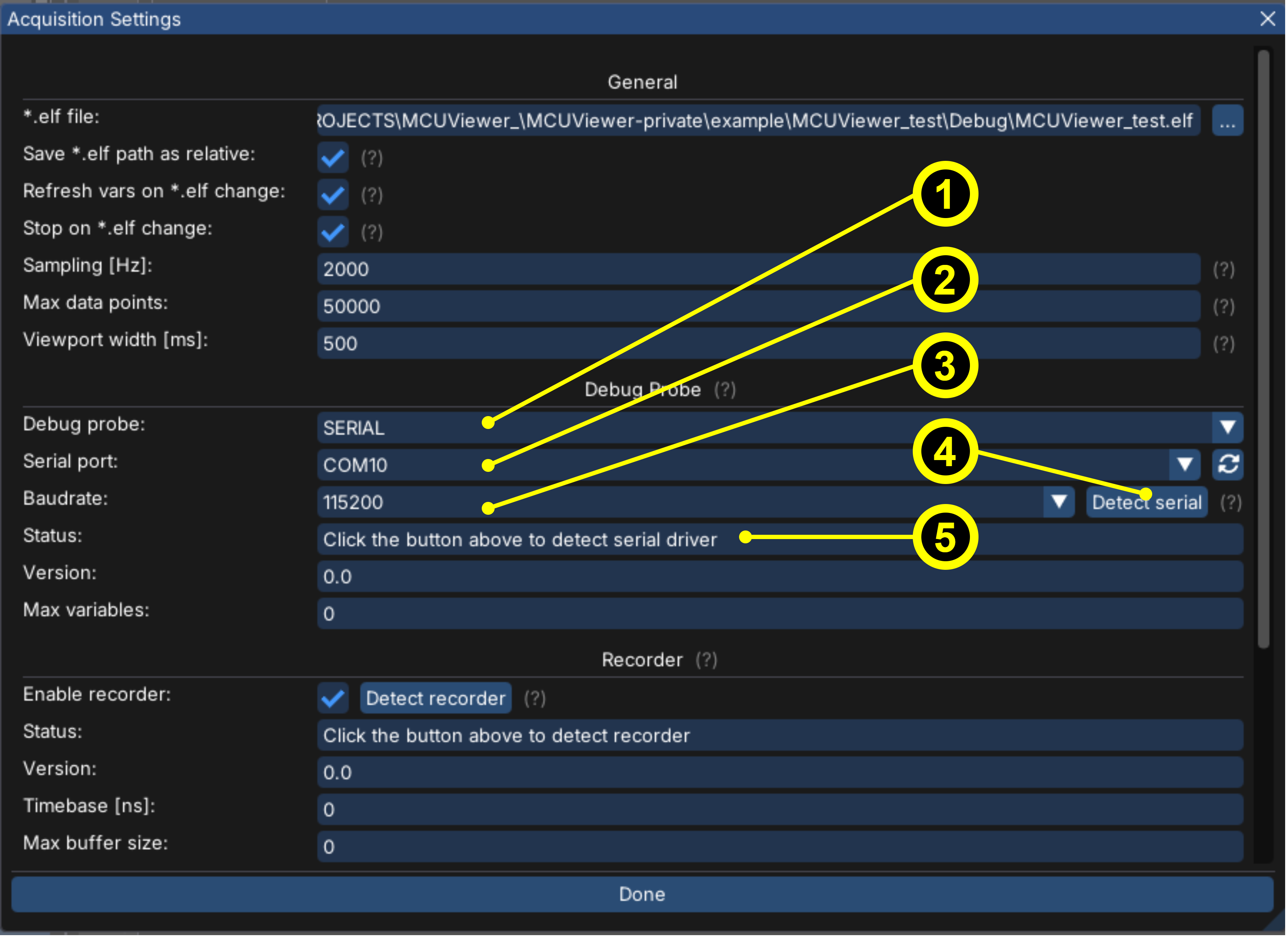
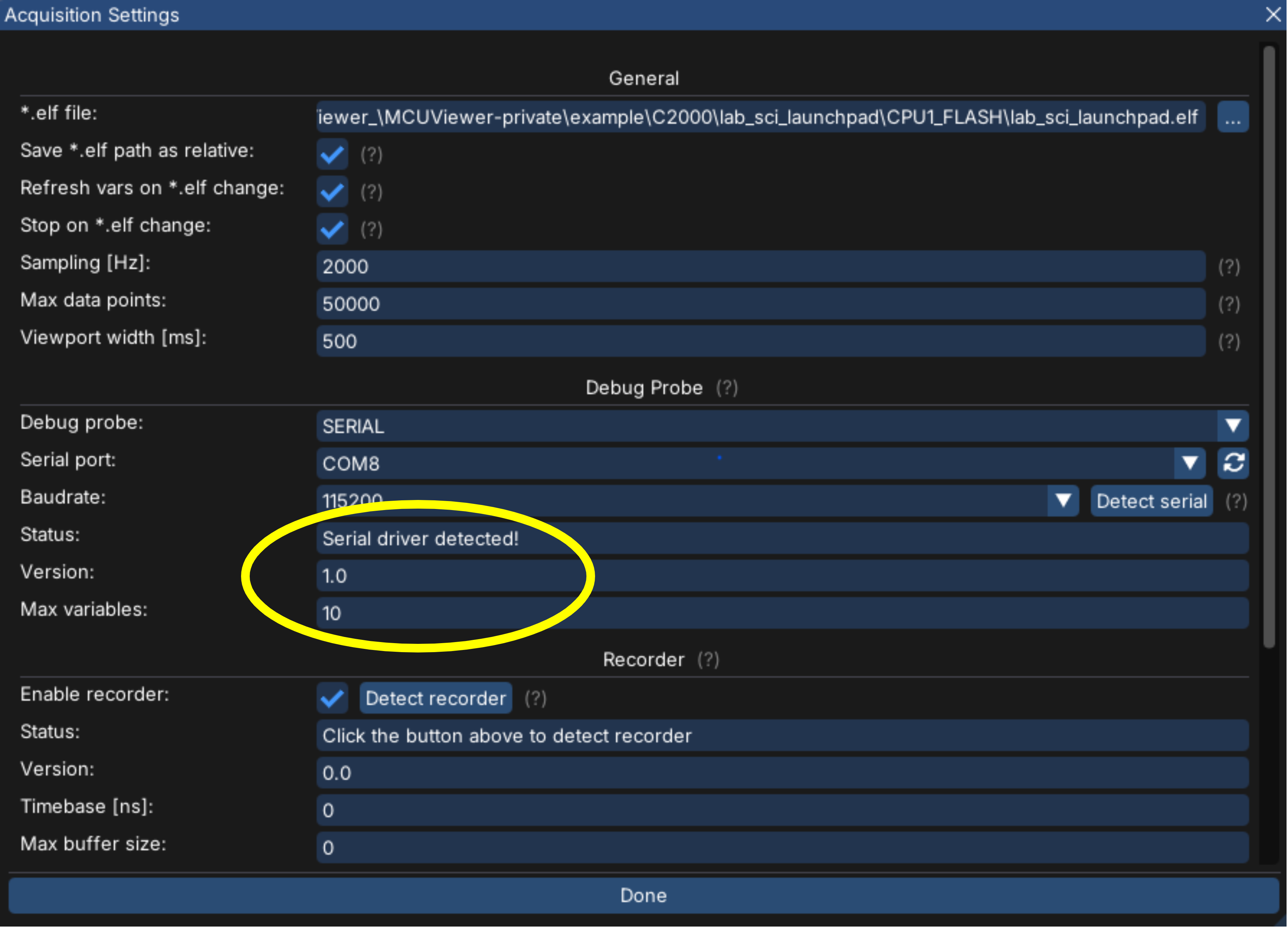
Next make sure the target is connected, powered on and click the “Detect serial” button (4). It should detect the serial driver version and max variables from serialDriverDefines.h file like in the picture below. Any errors will be listed in the Status text box (5).
Serial low update rate
When observing update rate issues first make sure your USB to UART converter is fast enough for the selected baudrate. If it is suitable then depending on the system you’re running on there might be different solutions:
Windows
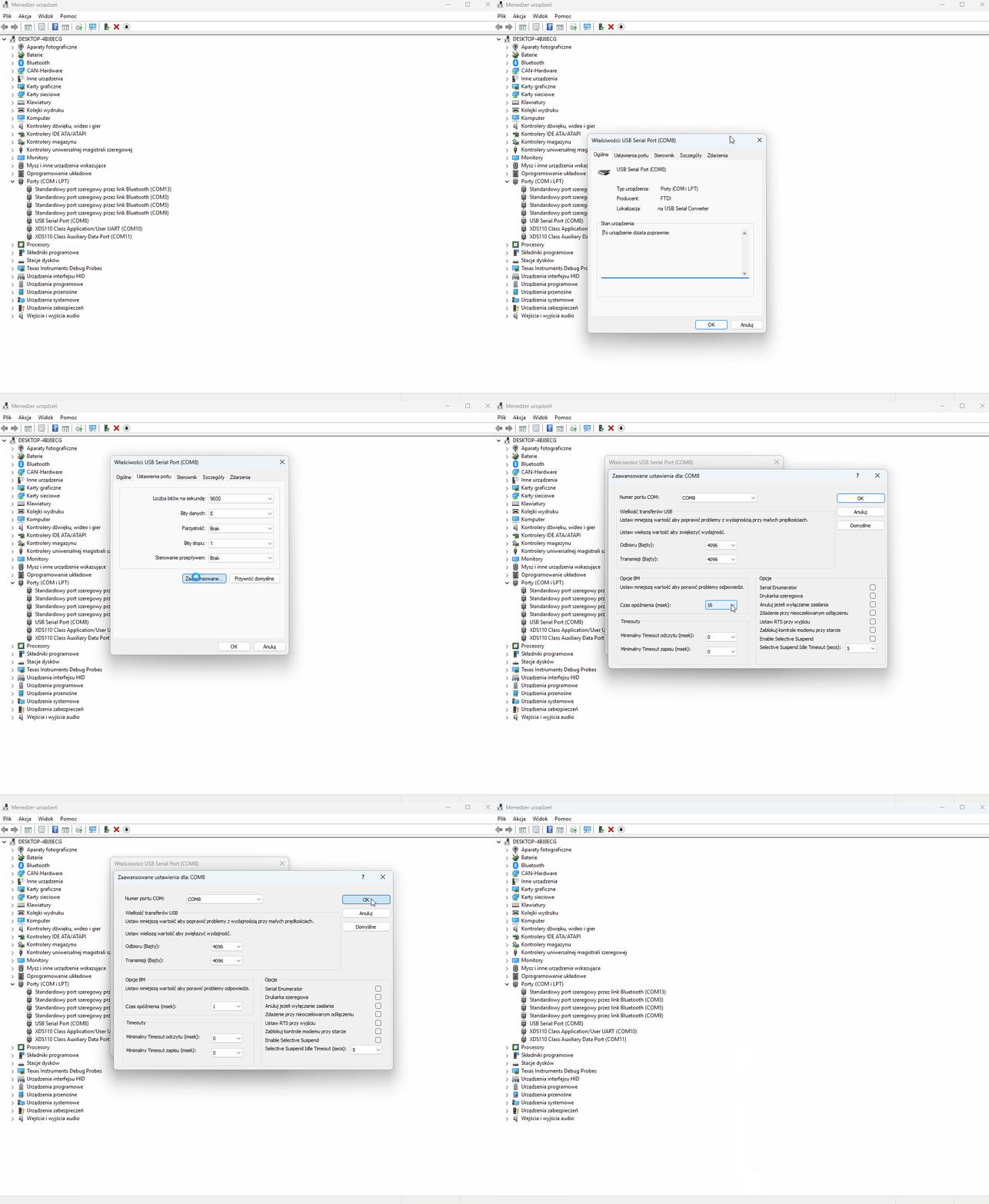
Please follow the gif below and change your converter’s settings in the device manager:
Linux
Check the actual latency:
cat /sys/bus/usb-serial/devices/ttyUSB0/latency_timerEdit file:
/etc/udev/rules.d/99-usb-serial-latency.rulesand addACTION=="add", SUBSYSTEM=="usb-serial", KERNEL=="ttyUSB*", ATTR{latency_timer}="1"Reload
sudo udevadm control --reload-rulessudo udevadm trigger, or log out
Serial driver profiling
Since serial driver is invasive, i.e. it takes some of the CPU processing time it is recommended to check the CPU load on your application. Below are the profiling results using Trace Viewer for STM32G4 target running at 150Mhz.
The setup
The setup from this test is an STM32g474 eval board with an STLink serving as UART to USB converter (VCP mode) connected to UART3 at 230400 baud and a JLink connected to the SWD and SWO pins.
There are two instances of MCUViewer:
One with the debug probe set to SERIAL and COM port of the STLink sampling a single variable on the plot (left side of the screen).
Second with TraceViewer and JLink used as the debug probe (right side of the screen).
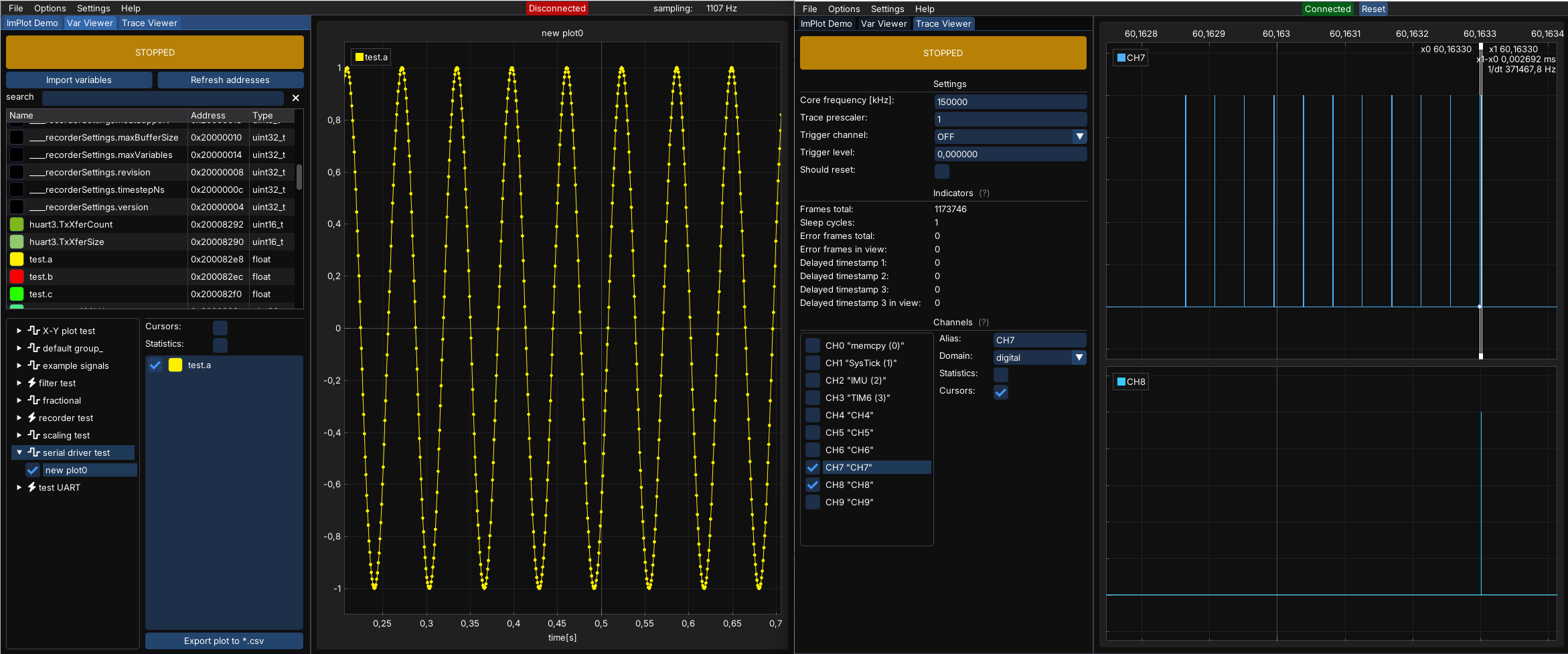
TraceViewer markers were put around the serial driver code to measure how long it takes to execute the serialDriverReceiveByte() function. Additionally channel 8 is used to measure the performance of the HAL_UART_Transmit_IT() function as it is called from inside of the driver.
void HAL_UART_RxCpltCallback(UART_HandleTypeDef* huart)
{
	if (huart->Instance == USART3)
	{
		ITM->PORT[7].u8 = 0xaa;     // <-------
		serialDriverReceiveByte(rxByte);
		ITM->PORT[7].u8 = 0xbb;     // <-------
		HAL_UART_Receive_IT(&huart3, &rxByte, 1);
	}
}

void serialDriverSendData(uint8_t* buf, uint16_t size)
{
	ITM->PORT[8].u8 = 0xaa;        // <-------
	HAL_UART_Transmit_IT(&huart3, buf, size);
	ITM->PORT[8].u8 = 0xbb;        // <-------
}
Let’s see that on the TraceViewer plots below:
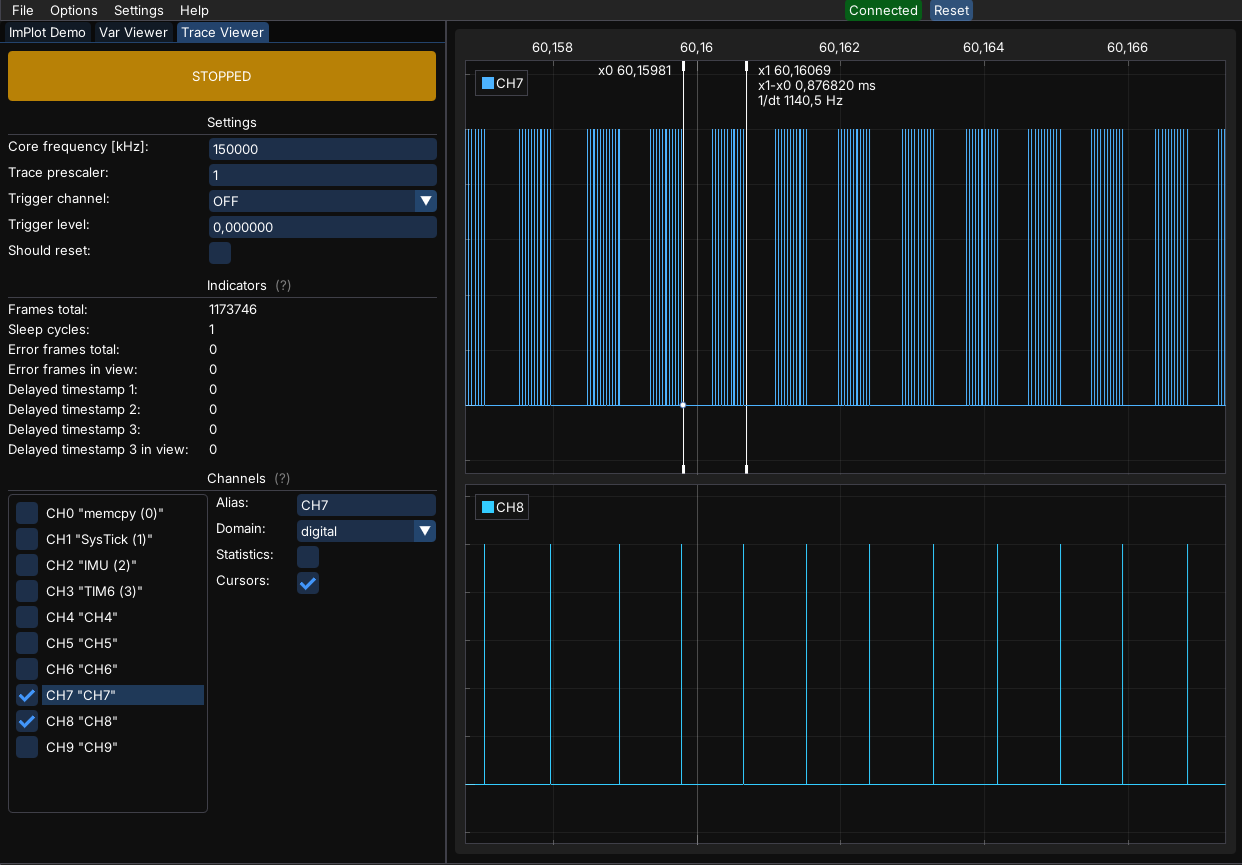
We can clearly see the packets of data sent with around 1kHz - the sampling frequency set in MCUViewer that uses the serial probe. Let’s zoom in:
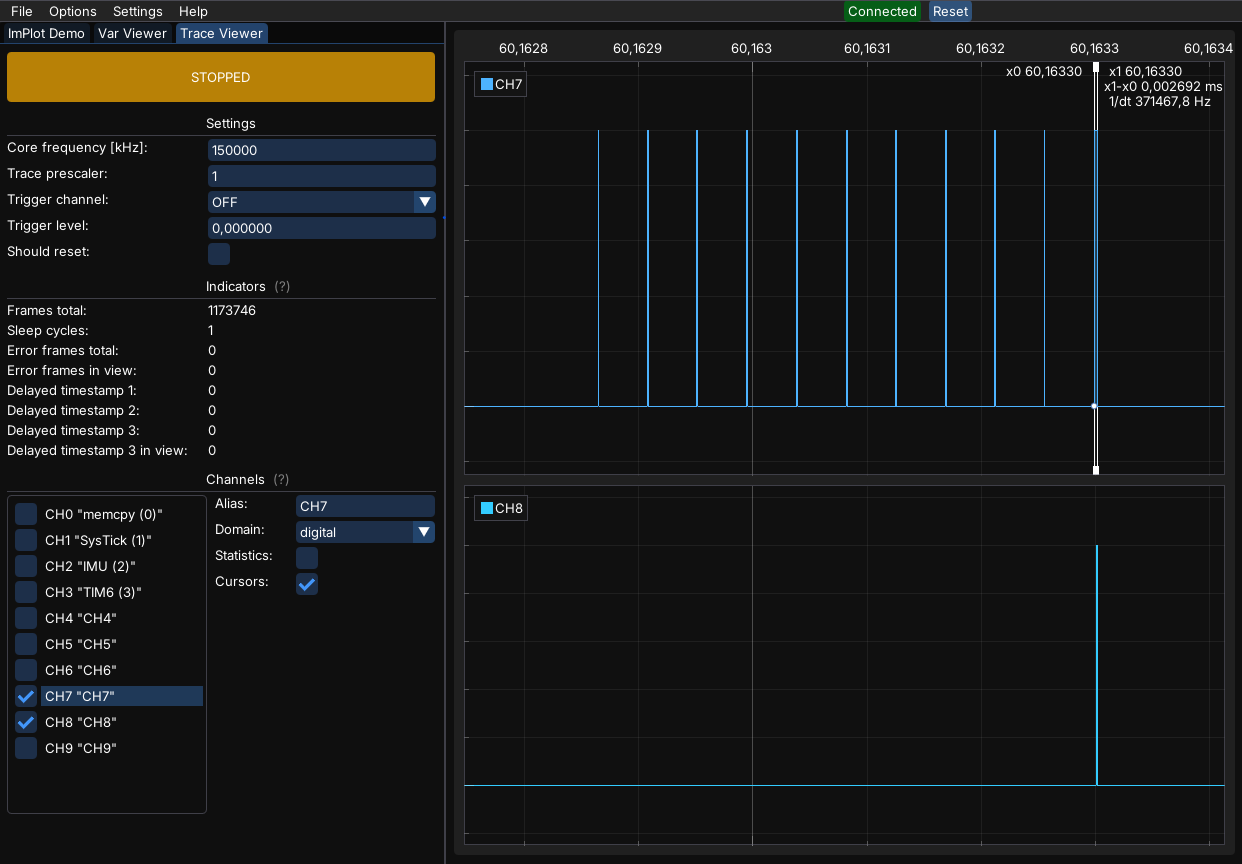
When we zoom we can see that there is some overhead each time a new byte is received (~800ns), and the longest it takes is to send the response back - this takes around 2.6us including the HAL function. Depending on the amount of variables being sampled the number of bytes will increase and the response function will take longer. Please remember these are the results for a concrete target (STM32G4 running at 150Mhz).